
← All modules
Daily planning
Job Board
Build the day, assign the crew, change the plan, and keep what happened.
 GroundControl module
What it does
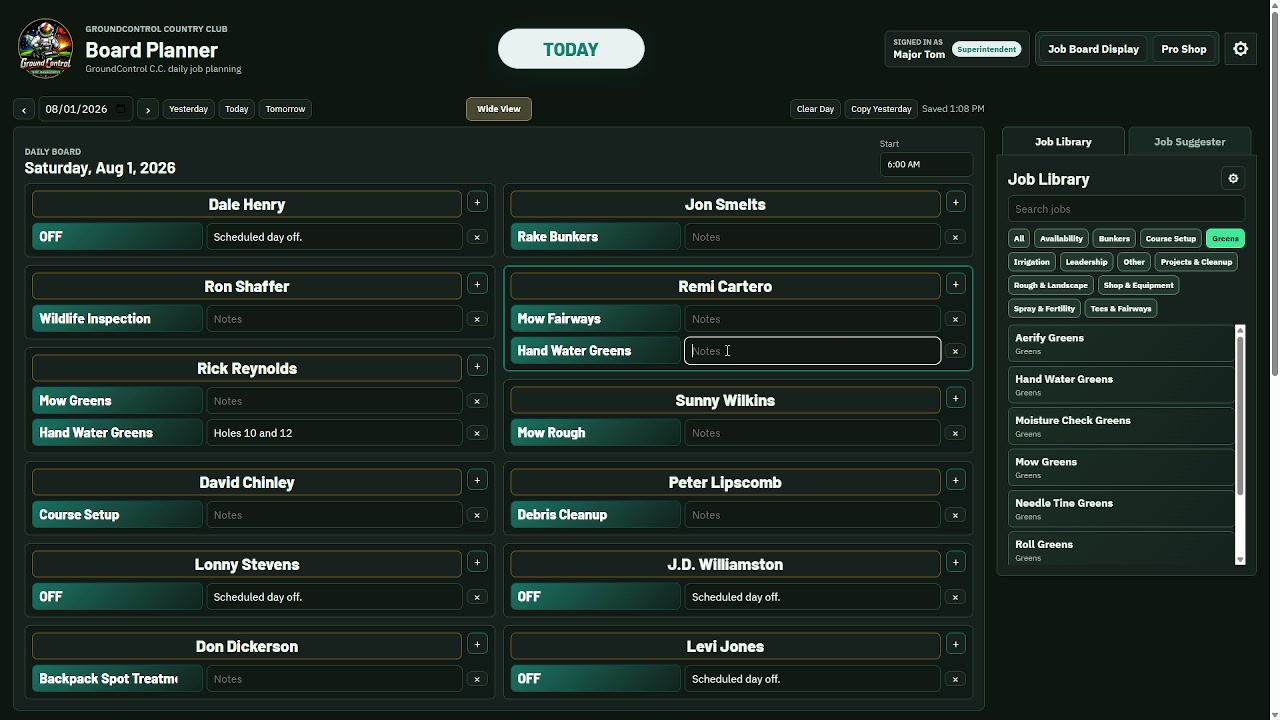
The Job Board gives the superintendent and assistant a practical place to build daily assignments, course setup, notes, and displays for the crew and pro shop.
Why it matters
After a season, you can look back by day, employee, or job and see how often work was assigned instead of rebuilding the answer from memory.
A normal workflow
From the first action to the record you can find later.
- 01Choose the day and course setup
- 02Assign work from the Job Library
- 03Adjust the board as the day changes
- 04Keep the assignments in course history
Important functions
The parts that make the workflow useful.
- Daily and six-day planning
- Crew, TV, and Pro Shop views
- Job Library and combined jobs
- Mowing directions and course notes
- Job, employee, and frequency history
- CSV history exports and translation
Demo
What to look for
Build a believable morning board, move one assignment, then show the crew-facing display and the archived result.
The pilot is built to use real course workflows. GroundControl will help shape the starting setup around the problem you want to test.
Try it on a real operation
Start with the part that solves a problem now.
GroundControl will personally help set up a working starting point for your course. Use it for 45 days and tell us plainly what helps and what gets in the way.